Published · Updated

Changes to a Hong Kong company’s directors, bank signing mandate and online banking users are related, but maintained separately. Completing a director change does not automatically update the bank’s records or online access. Without checking each bank, a departing person may remain authorised, while a new appointee may not yet be able to initiate or approve payments.
Consider a hypothetical case: a departing director is both a bank signatory and the main online banking user. The company must handle signing authority, online roles and pending payments separately. This is an operational illustration, not a real client case. Requirements vary by bank, company type and account setup; confirm the documents and effective dates with each bank.
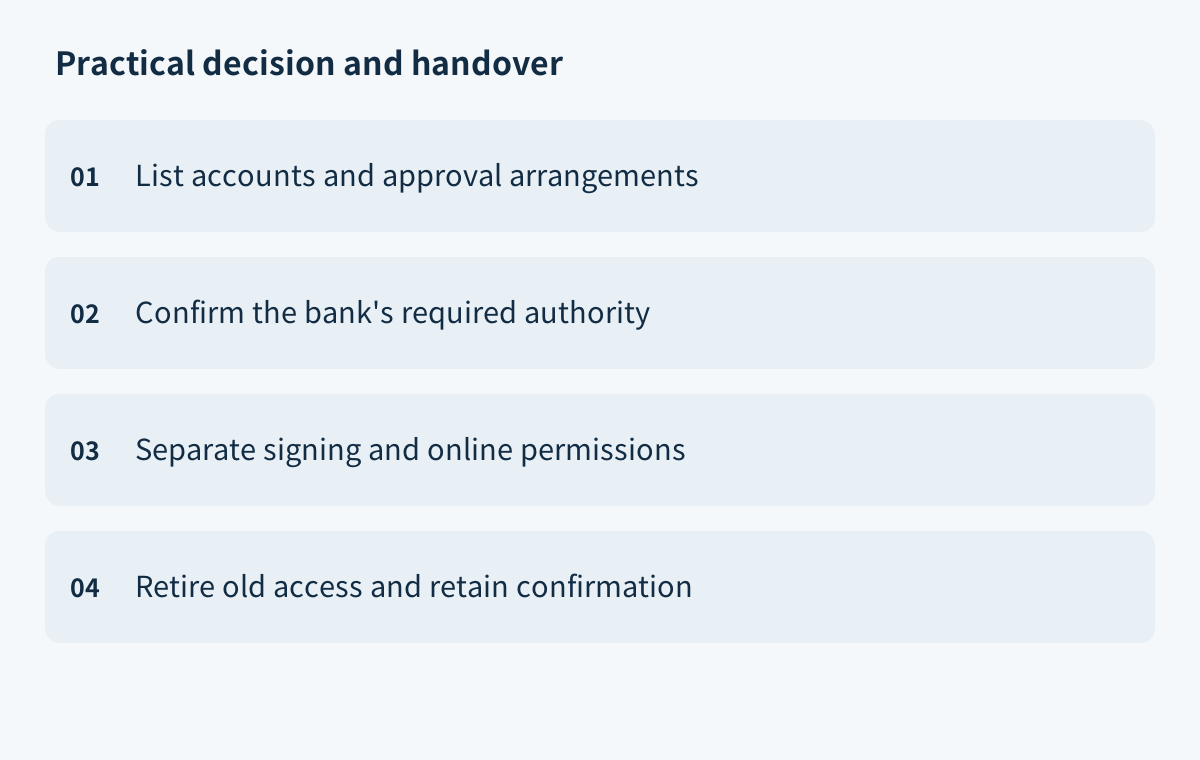
A Director Change Does Not Automatically Update Bank Signing Authority
After a director change, record its effective date internally and contact each bank to verify its current records of directors, authorised signatories and signing instructions. An internal register or appointment document does not prove the bank has updated its records. Check recent account documents, mandate records and online access pages, then ask what must be notified separately.
The Hong Kong Monetary Authority (HKMA) says banks in Hong Kong conduct customer due diligence on new and existing customers, along with ongoing monitoring under anti-money-laundering and counter-terrorist-financing requirements. Some banks must also follow head-office or overseas regulatory requirements, so account-opening requirements may differ. This context does not establish universal documents or a standard signatory-change timeframe. The page was last revised on 10 July 2025. HKMA: Account Opening and Maintenance
Ask each bank whether the company’s director details are current, whether a separate application is needed for signatories or signing rules, and what effective date and confirmation channel it will use. Record replies, submission methods and open items in one handover sheet as confirmed, awaiting documents or unanswered. This keeps the company’s internal change date distinct from the date bank permissions actually change.
An HSBC business account tip published on 17 October 2025 also advises businesses to tell their bank about changes to business or organisational information. That is HSBC guidance, not a uniform rule. HSBC Business Account Fitness Series: Tip #7
Inventory Accounts and Payment Approval Methods First
Before applying, prepare a bank-by-bank, account-by-account inventory. Record the account-holding company, account identifier, currency, purpose, recorded signatories and mandate. Include multiple accounts, foreign-currency accounts and payment channels. Do not assume one account’s rules apply to another, or infer bank access from a person’s job title.
Map each payment flow: who creates, reviews and approves payments; whether joint signatures or a second check are required; and how instructions are sent. Use the bank’s mandate or confirmation as the source of truth. List cheques or paper instructions, online payments and batch payments separately, marking each person’s role as creating, reviewing, approving or viewing. This can reveal whether a departing director holds several permissions or operations rely on one person.
Mark unfinished items too: created but unapproved payments, scheduled instructions, batch files not yet submitted, and change applications awaiting bank action. Ask the bank for each transaction’s status, which steps an access change may affect and what channel to use next. Do not assume a mandate update will cancel or preserve a payment. The handover sheet should identify the account, payment type, initiator or approver, and open items.
If a record is unavailable, mark it for bank confirmation rather than filling the gap with another account’s rules. Resolve unknowns before submitting the change request.
Prepare Resolutions and Identity Documents as Each Bank Requires
There is no universal document checklist. Ask each bank for its current forms and submission instructions. Confirm requirements for your company type and the requested change, including resolutions, identity documents, specimen signatures, certification, language and filing channel. If the signatory is a legal entity or acts through a representative, ask which entity and representative records are needed.
HSBC’s public guide illustrates one bank’s process: individuals can update their details online. For paper filing, HSBC lists a Business Information Update Form, plus a new signatory’s specimen signature and identity-document copy. Its separate paper checklist for corporate signatories includes a board resolution, specimen signature, entity registration documents, evidence of the entity’s name, legal form and current status, and government-issued ID for the signatory. HSBC may require certified copies and further information. These requirements are HSBC-specific. HSBC Business Information Update
Record each item, the person it applies to, signing or certification requirements, whether an original or copy is needed, language, owner and status. Make the resolution identify the authorised person and the scope of authority, and align it with the bank’s form. Follow the bank’s instructions; do not assume a photocopy or electronic signature will be accepted.
Before filing, check names, company name, authority scope and document versions. Keep copies of what was submitted and proof of delivery. If the language or format is uncertain, ask whether translation or certification is needed and who should arrange it. Do not generalise HSBC document-age limits, certifier choices or filing rules across Hong Kong banks.
Manage Online Banking Access Separately from Physical Signatures
Physical signing authority determines who may sign instructions for the company and under which signing rules. Online banking may separately assign primary or secondary users, payment-creation and approval rights, viewing access and authorisation devices. Track these permissions separately and check whether one person holds several roles. A working online login does not prove that the bank’s signing mandate is current; updating signatories does not prove that the online user list has changed.
Ask the bank which channel to use for each change, what status the applicant must hold, and how to check progress. Under HSBC’s online business-information update process, the applicant must be a Business Internet Banking primary user who is also an authorised signatory. Secondary users cannot use the feature. Some company types and online banking arrangements linked to associated companies are also ineligible. These are HSBC’s conditions, not a rule for other banks. HSBC Online Business Information Update
The cited HSBC page states a fastest processing time of four working days, provided the specified steps are completed, the instruction is successfully submitted for processing, and the information is complete and accurate. This is not another bank’s timeframe or a guaranteed completion date. Ask the bank you use about its expected process before setting internal payment or contract handover dates.
When the update is complete, verify the physical signing instructions and online user roles separately. If the bank has completed only part of the change, keep the remaining items open; completion in one channel does not show that every permission is effective.
Revoke Old Access and Manage Payments in Progress
Before revoking old access, list unfinished payments, scheduled transactions, batch payments and outstanding cheques. Ask the bank whether each instruction is drafted, awaiting approval, submitted or processed. Confirm how the access change will affect transactions in progress, whether anything must be resubmitted and whether the former authorised person may still complete any transaction. Check each item by its status and channel; do not assume all payments will be handled alike.
In the hypothetical case above, the departing director is both a signatory and the primary online banking user. The company must separately manage the signing mandate, online user role and pending payments. Confirm with the bank how the new signatory should submit documents, when a new user will be activated and when the old access will be revoked. Assign someone internally to track each open transaction. If the new access is not yet active, ask the bank which approval or payment methods are available in the meantime; do not bypass its existing controls.
Do not share login details as a handover method. Handle the personnel change through the bank’s individual-user application or update process, and confirm that the departing user’s login, authorisation devices and related permissions have been disabled. Recovering a phone or sending an internal notice does not establish that bank access has been revoked.
Record each payment’s final status, the person who handled it and the bank’s response. Assign an owner and next step to every unfinished item. Keep any requests for further documents or renewed authorisation with the submission record, so the incoming and outgoing personnel can see what remains open.
Retain Bank Confirmations and an Access Register After Completion
When the bank replies, verify the change by bank and account. Check the new signatory’s name and signing rules, and confirm the former signatory has been removed. Separately check primary and secondary online users, payment-creation and approval rights, viewing roles and authorisation devices. If the bank has only acknowledged receipt and has not confirmed completion or the effective date, mark the item as in progress and note how to follow up.
Keep the bank’s confirmation, email or case reference, submitted-document list, company resolution and an access register for each account. The register can record the account, current authorised persons, actions they may perform, change date, confirmation status and internal owner. Retain only information needed for the handover and make it available to appropriate company personnel. Do not put passwords or security-verification details in a general handover sheet.
Have another company representative check the bank’s confirmation: the new permissions work, old permissions have been revoked, payment arrangements match the company’s decisions and approval rules, and every pending payment has a clear outcome or owner. If actual access differs from the bank’s notice, ask the bank through its designated channel; an internal register does not replace the bank’s records. Banks update records according to their individual arrangements, and this guide assumes no common completion timeframe or statutory retention period.
If you are still preparing a Hong Kong company bank-account application, see Hong Kong Company Bank Account Opening: Reasons for Rejection and Preparation Checklist. For a case-specific assessment, contact the website through its published contact channels. This article is not legal or tax advice and does not guarantee an outcome.